Red Light Blinking Errors of Sony KDL-40R470A TV
Sony KDL-40R470A Red Light Errors Fix How to Fix the Red Light Blinking Error of This Model In this article we will learn what each red light blinking means. I will write the knowledge in this article in the light of my experience. These articles will consist of different Sony models; that is, this is a series that is brought to you by Sony LED TV Repair Center.Sony KDL-40R470A Red Light Errors Fix
Why the Red Light Error Blinks
Why Does the Red Light Error Blink in Sony LED TVs? You should understand this as a protection that turns on due to a fault in the TV. We will write the reasons for this fault step by step so that the true knowledge in the true sense of this article reaches you. I always try to share my experience of doing my work.2 time red light blink
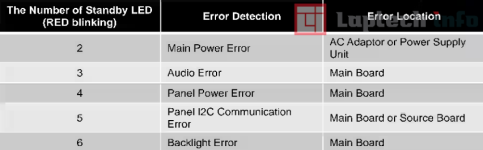
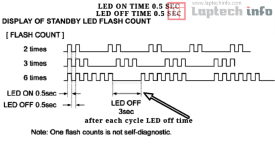
The two-time red light blinking in this model is related to the power supply. I am talking about the main power supply board. You should first check the PFC circuit in this board. I mean, check the voltage on the main filter capacitors of this board. 380 volts must be coming here. If it is less, then the fault is here. After that, check the 12-volt supply.3 time red light blink
The fault of the 3-time red light blink can occur in two areas. In the tuner section, for this you should check its VCC supply line and check the clock data of the tuner. Here 3.3 volts should come on SDA & SCL. And the second section is the audio amplifier. Regarding this, you should check the main VCC power supply of the IC and its source connection (digital signal), which is connected to the system IC.This error also occurs on the 3.3-volt line and the 5-volt line. From these two lines, the reference voltage goes to the system IC through the voltage divider resistor. If any of these reference volts is missed, a 3-blink error fault will occur. See my specific article on how to search for these voltage divider resistors.
4 time red light blink
4-time red light blinking The balancer error is not used in this model.5-time red light blink
T-con error and panel error (not used)6-time red light blink
6-time red light blink This is a common red light blinking error that occurs in all Sony models. To trace this, we must first test the backlight strings very carefully. The common positive voltages are from the IC, and the negative ones come from the IC. It depends on how many inches the set is. There can.be from two to six lines. Negative. You can check them one by one with a good backlight tester. If you find that there is a difference in the voltage reading of one or more backlights or they are drawing more milliamperes, then confirm that the backlight is faulty and replace it.
6-time red Light error circuit issue
6-time red A light error circuit issue also occurs, but its chances are less, but if there is a problem in the circuit, then you first have to check the main VCC supply line of the backlight drive IC. It is usually 12 volts. Check the resistance of the entire circuit carefully. It would be better to read the data sheet of the IC and work by understanding the circuit.7-time red light blink
This is a temperature error but is not used in this model.sony tv service center in coimbatore visit itbyte.in