Repair Tips for KD-43X72K Red Light Blink Codes
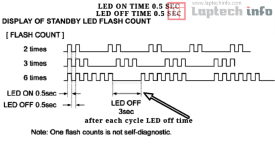
Sony KD-43X72K Blinking Error Codes Guide Let’s learn what the solution is to the red light blinking error of this Sony model. We will understand all the recurring error codes used in this model step by step and also present their solutions so that it can be easy for fellow technicians. This article is being published by Sony LED TV Repair Center, and it will be a complete series for you. In this series, we have provided complete information on error codes of various models.2 Blinks Error – Power Supply Fault
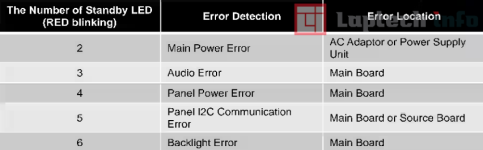
To solve the 2-time red light blinking, you need to test the main power supply adapter/main power supply. If it is fine, you need to search for a voltage divider resistor on the main board of the set that provides the reference to the system IC. In short, this fault is related to the power supply.3 Blinks Error – Audio System Fault
To diagnose the 3-blink error fault, you will need to check the VCC voltage of the audio amplifier IC on its main board and check the digital source connections of this audio amplifier to see if they are communicating properly to the system IC or if there is an array resistance fault along the way.4 Blinks Error – Panel Power Issue
4-time red light blinking error shows the power error of the panel in this set. For this, you need to check the VCC voltage of the panel, which should be twelve volts, and whether it is present or not. If it is not present, then find the reason for it and check the MOSFET for the VCC of the panel.5 Blinks Error – Panel Communication Failure
The 5-blink error fault is also related to the panel; for this you will have to check the 12C communication from the main board to the T-con board. In simple words, check the clock data that is used for the panel ID. This fault is often caused by the LVDS cable or strip.6 Blinks Error – Backlight Failure
Six times red light blinking error This occurs in almost every set due to the backlight. You should first confirm the backlight, whether it is fine or not. There is an 80% chance that the backlight itself is faulty. If it is fine, then check the backlight circuit to see if the circuit is boosting up or not.
Six times red light blinking error This occurs in almost every set due to the backlight. You should first confirm the backlight, whether it is fine or not. There is an 80% chance that the backlight itself is faulty. If it is fine, then check the backlight circuit to see if the circuit is boosting up or not.
Sony KD-43X72K Blinking Error Codes possilbe sollution
- 2 Blinks Error – Power Supply Issue:Check the main power adapter and voltage divider resistor on the main board; the fault is usually in the power supply section.
- 3 Blinks Error – Audio Amplifier Fault:Verify VCC voltage and communication between the audio amplifier IC and system IC; inspect array resistors.
- 4 Blinks Error – Panel Power Problem:Check the 12V panel supply; inspect the MOSFET responsible for the panel VCC if voltage is missing.
- 5 Blinks Error – Panel Communication Fault:Examine 12C/clock data between the main board and T-con board; it is often caused by a faulty LVDS cable.
- 6 Blinks Error – Backlight Failure:Inspect backlight LEDs and boost circuit; 80% of cases are caused by backlight strip failure.
- All Errors Guide – Step-by-Step Help:This series explains all Sony KD-43X72K blinking faults with verified repair solutions for technicians.